
Subscribe

Enter your email to receive our updates in your inbox

Why Keynote is better than PowerPoint

Keynote logoWhen it comes to presentations, most people use Microsoft PowerPoint but for me, Apple Keynote beats it hands down everytime. PowerPoint isn’t a bad application (it’s one of Microsoft’s better efforts in my opinion) but it does not produce the slick, polished results you get in Keynote and putting it together simply isn’t as much fun. It says something that Al Gore’s award winning Inconvenient Truth presentation/documentary was produced using Keynote.

Apple’s flagship presentation program is easy to use yet generates drop-dead stunning presentations from photography portfolios to business presentations.

Keynote Screenshot 1

The final result you get with Keynote is something akin to a cinematic presentation rather than the rather stale efforts you get with PowerPoint. The reason is that PowerPoint is optimised for Windows but Keynote is optimised for Macs and where anything that’s design orientated has been optimised for Macs, there can be few arguments which is going to be better.

In keynote, you can add slick transitions and effects that are simply not possible with PowerPoint, including animated moving objects. Adding and removing backgrounds is simply a drag and drop process with Instant Alpha and there are some stunning themes to choose from. Photo presentations are particularly easy - you only have to drag and drop photos and Keynote does the rest including choosing the transitions and even the backing music.
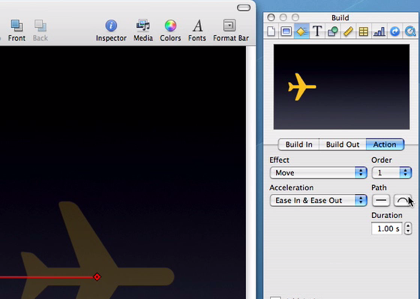
Keynote Screenshot 2

The typography, as in all Mac applications, is naturally better in Keynote. And importantly, Keynote allows you to export to several different formats including QuickTime, PDF, JPG, Flash and PPT so that PowerPoint users can at least still view what you’ve produced, even if they can’t edit the presentations in Keynote - more’s the pity for them.

Recent posts

Reader comments

  1. Torley

    Posted at 5:34 pm on Dec 4th

    Agreed on those points! I struggled to come up with something with PowerPoint, but to this day, even its templates reek of cruddy uselessness. Keynote gravitated to my flow and helped me get the job done. I know that sounds like a shill testimonial (heh-heh), but ’tis really what happened.

    Elegance helps inform the perceived quality of a product, and Keynote (and all of iWork by extension, for that matter) has elegance in spades! And other card suites. ;D

  2. 20 Tips to Help You Suck Less At PowerPoint « Jeff “the Blog” Bonforte

    Posted at 2:59 am on Feb 10th

    […] Don’t use PowerPoint, use Apple’s Keynote 09 ($79) even if it means you have to go out and by a Macbook ($1000) only for making presentations. Even when I worked at a big company who dictated I use a PC, I brought my own Mac for presos. Like a carpenter, I am happy to bring my own tools if needed. Others agree with me. […]

  3. Richard

    Posted at 7:09 am on Feb 10th

    You can animate objects on a path in PowerPoint. It’s even easy.
    It’s been a feature since at least PowerPoint XP. http://office.microsoft.com/en-us/powerpoint/HA100214971033.aspx?pid=CH100673441033

  4. Jeff “the Blog” Bonforte « Yet Another VC Blog

    Posted at 11:30 pm on Feb 10th

    […] Don’t use PowerPoint, use Apple’s Keynote 09 ($79) even if it means you have to go out and buy a Macbook ($1000) only for making presentations. Even when I worked at a big company who dictated I use a PC, I brought my own Mac for presos. Like a carpenter, I am happy to bring my own tools if needed. Others agree with me. […]

  5. Cliff

    Posted at 7:11 pm on Mar 11th

    I like PowerPoint, as it is that which I am familiar. Also the majority of the business world uses PowerPoint, so easier collaboration if all parties are using PowerPoint. Finally, for the business world, the point of a presentation should be to get your point across. Studies have shown that all the added busy-ness of transitions, etc, adds nothing to getting a point across. Some presentations may warrant dramatic and “pretty” transitions and effects, but most presentations would be more effective if the presenter stuck to the simple facts. That is something that PowerPoint does as well as any other software.

  6. Rick

    Posted at 9:28 am on Mar 26th

    I created my first presentation ever using powerpoint just this last summer (08) using powerpoint ‘08 on my brothers MacBook Pro and I felt that I was able to create a very good presentation. But, when I tried to transfer my beautiful presentation from the mac to the companies XP based pc I was sorely disappointed to see my smooth drop shadows become horrible black or gray blobs behind my text and graphics. I hadn’t included any animations, videos, or transitions, thankfully, but in the end I made the presentation using my brothers mac. When I showed my bosses the presentation I created their comments were unanimous that it looked VERY professional. Later (Nov 08) I got my own MacBook Pro and created another presentation for work using Keynote ‘09 and my bosses were blown away! These are people who suffer from seeing dozens of presentations a year. Now, I will take some credit in that I do have a background in graphic design and page layout but, when people who normally dread seeing an approaching presentation come at you with smiles and hand shakes telling you “It was fantastic” or “That was an excellent, excellent presentation” you have to give some kind of nod to the tools you are using.
    Now, I haven’t seen a presentation created and shown with Vista, but as far as XP, I will say that the PC in general cannot produce a program that is as smooth and professional in appearance as the Mac without a number of workarounds, like importing shaded and shadowed text from photoshop. On the Mac however, my experience says that PowerPoint on the Mac will look better than and feel more professional than PowerPoint on the PC, while Keynote on the Mac will just blow PowerPoint on either platform away for look and feel. It may not be as feature rich as PowerPoint but, like many programs Apple produces, Keynote excels at the features that are most often needed. And, while content may be king, listening to a speaker who is focused and clear in their message is far more interesting than the presenter who rambles, studders, and stumbles through their presentation. PowerPoint can produce perfectly serviceable presentations, I’ve done it. But, keynote can help you leave your audience stunned and amazed. Message received. Clearly!
    Sorry for being long winded.

  7. Nicholas Mead

    Posted at 10:20 am on Mar 26th

    I couldn’t agree more Rick. Thanks for sharing your illustrative experiences.

Add your comments