 I’ve been used to receiving spam on IM clients such as MSN Live Messenger and Adium for a long time now. What usually happens is a contact I haven’t spoken to for years will suddenly pop up telling me to click on this “great link” or implore me to “check out this great site – you won’t believe it!”. However, increasingly I’ve been experiencing this problem with Skype too and according to the Skype forums, I’m not alone.
The last time it happened to me, a chat box simply popped-up from a supposedly female contact called “-sex”. The spam message was quite simply a smiley emoticon with a party hat on.

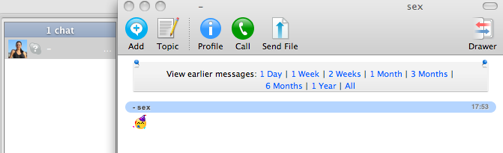
While this type of spam is fairly harmless, other types are more sinister, such as the one received by a user on the Skype forums who reports:
At 08.00 today I had a skype call from ” his lordship”. (lordship.pua) skype user, He claimed to work for my bank and they were doing some work on my account !! Could i please confirm my sort code and account number.
Other users report spam messages that claim their PC has a virus, content that includes crude pictures and sexually explicit messages aimed at female users. The problem is due to the fact that Skype simply aren’t filtering spam as they should be, which I find inexcusable. I have no spam problems when using an IM client such as Google Talk, so there’s no excuse for a company as big as Skype to not be just as vigilant too. Until they finally take action, there is unfortunately very little you can do about this problem other than restrict messages to only those that are in your contact list.
On Windows, do the following:
- Open Skype, click “Tools” and then “Options”
- Click “Show Advanced Options”
- Select the following to ensure maximum privacy: Allow Calls from only people in my contact list, Automatically receive video from no-one, Show that I have video to no-one, Allow chats from only people in my contact list and uncheck “allow my status to be shown on the web”
- Click “Notifications” and uncheck “pop up a window when someone requests my contact details”, “Display notifications in the Windows tray when someone comes online” and “Display notifications in the Windows tray when someone requests my contact details”
On Mac:
- Select “Skype” and then “Preferences”
- Select the “Privacy” tab
- Follow the same steps as for Windows above
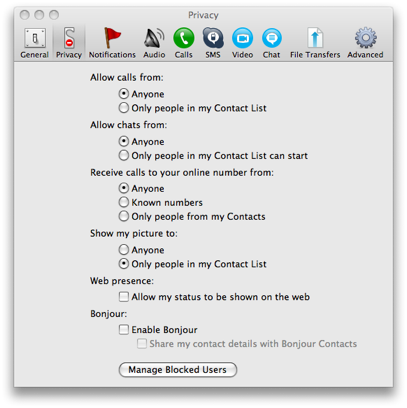
Doing this obviously limits your availability on Skype and will cause problems if someone is trying to call you for the first time and you haven’t added them to your contacts. However, until Skype starts blocking spam itself, this is the most effective way to protect yourself from uninvited guests. For a more in depth look at Skype spam, check out this interesting article at VoIP News which dates the problem back to early 2008. If after reading that you’ve really had enough, then take a look at the post I wrote a while back about 5 alternatives to Skype.