The dangers of using CCleaner
Here’s a conundrum for you. Normally we’re full of hints and tips at OnSoftware but this is an appeal for help from you the readers and also a warning of the dangers of usingĀ CCleaner. Basically, I’ve got myself into a lot of bother after an over zealous cleaning session with it and can’t start Windows on my Acer Aspire 1414. Since my CD/DVD drive is broken, I can’t use a Windows XP disk to boot so the only option available to me is to perform a Network Boot.
Unfortunately, I have no idea how to do this which is why I’m appealing for help. Why on earth the bios won’t let me boot from a USB drive I have no idea but it’s a glaring error by Acer. The problem started after using CCleaner to uninstall programs, clean the hard drive and “fix” the registry. On restarting, my Acer Aspire booted as far as the Windows XP logo before going straight to the blue screen of death and now won’t even let me start in Safe Mode. The Acer bios gives me only one other boot option - a Network Boot - which I’ve been unable to figure out. A search on the internet reveals network booting involves a scary world of PXEs and DHCP which I’ve found very hard to understand. All that I know is that I have to connect my Acer laptop to another laptop with an ethernet cable!
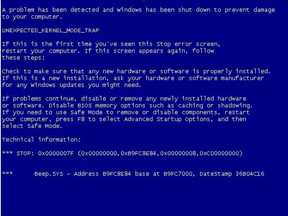
The blue screen of death error code I’m getting is a “C000021a (fatal system error) The session manager initialization system process terminated unexpectedly”. It’s clear that the problem is related to the session login part of Windows startup i.e. the bit where you click your username and enter your password to use Windows. I don’t see why this should stop me at least starting in Safe Mode but if I ever do get it started again, I’m going to remove the session manager completely. Beware all those that currently use it and CCleaner at the same time.
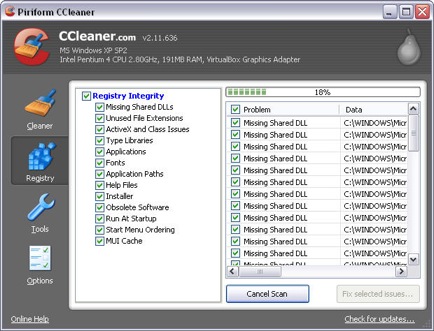
I can’t be sure which part of CCleaner did the most damage. If it was the registry fix that caused this problem then CCleaner is the most ridiculously designed application ever. It sensibly prompts you to make a backup of your registry in case of system errors after fixing it but what’s the point of making a backup if you can’t even start Windows afterwards?! It may however have been something that I uninstalled. One of the great things about CCleaner is that it reveals absolutely everything installed on your system, including those things that probably should be left alone. I made sure only to remove those things I knew were unused programs but it is possible I accidentally removed something related to the session manager.
I used to love CCleaner but it can also clearly do a lot of damage so use it with care. And if you’ve got any experience of Network Booting, your help would be greatly appreciated!

Posted at 6:10 pm on Sep 29th
Most Acer laptops do have a PQSERVICE partition. You can boot from it (i think Alt-F10) and do a clean install.
Posted at 6:11 pm on Sep 29th
Oh btw, i am a big fan of your site. And keeps my English a little up 2 date. Thx.
Posted at 9:50 pm on Sep 29th
CCleaner probably didn’t do this to your computer. If you would have said “I used HijackThis”, then yeah you probably messed your computer up. Too many people have been using this product safely for years and I’ve yet to see any problems caused by it.
According to the Microsoft website: http://support.microsoft.com/default.aspx?scid=kb;en-us;156669
The STOP 0xC000021A error occurs when either Winlogon.exe or Csrss.exe fails. When the Windows NT kernel detects that either of these processes has stopped, it stops the system and raises the STOP 0xC000021A error. This error may have several causes. Among them are the following:
* Mismatched system files have been installed.
* A Service Pack installation has failed.
* A backup program that is used to restore a hard disk did not correctly restore files that may have been in use.
* An incompatible third-party program has been installed.
Posted at 5:24 am on Sep 30th
Hello.
This is awesome. I have time reading this blog, but I never imagined to find an entrance as groundless as this. CCleaner is cleaning software more secure and stable I have known, I’ve been using it and recommending it, and so far is the first “complaint” (without foundation, of course) I’ve read.
Actually your problem is what says Lewis Lee, before making judgments so harsh, calling the attention of a Latin American (Venezuelan, to be more specific), I recommend that you use the power that Google will provide free, seeking information about what causes the problem you have.
Greetings.
Ah, sorry for my bad English but I speak Spanish.
Posted at 10:05 am on Sep 30th
@Kevin and @Lewis
While you’re right that CCleaner isn’t a dangerous program, per se, it is important to remember that ‘cleaning’ the registry unnecessarily or too enthusiastically can result in problems.
Just like any tool, CCleaner can be hazardous if it’s used incorrectly. Maybe Nick should have taken a bit more of the blame for what happened.
Posted at 10:28 am on Sep 30th
@just4onec0mment THANK YOU! You have saved my laptop. The Alt+F10 PQSERVICE trick worked! It launched the Acer into a “hidden” recovery utility which reinstalled Windows XP from scratch without even the need for an XP CD
After 4 years of owning an Acer, I can’t believe I never knew about this. One thing - is it possible to recover any of my files or has the recovery utility wiped the entire hard drive with a clean install of XP?
@Kevin and @Lewis I did concede in my post that the problem may have been caused by something that I uninstalled and that it is “possible I accidentally removed something related to the session manager.” I simply can’t be sure what caused the problem because I did so much cleaning in one go which maybe goes to prove that, for big clean up jobs, it’s best to use CCleaner one step at a time i.e. uninstall programs and then restart, clean the registry and then restart etc.
Posted at 11:16 am on Sep 30th
@ Tom: But keep in mind that registry cleaning is not fanciful, conversely, trying to determine what registry entries with errors, which are invalid, and therefore allows you to delete them, which means better system performance.
@ Nick: Yeah, maybe I was a little aggressive in my comment, but I’m much time working with CCleaner and I did not imagine reading an entry on a blog such as OnSoftware; in Castilian, Softonic is the leading site downloads free, so the level of professionalism is extremely high, which is synonymous with security in what is published on the blog. This, frankly, not expecting it. I think they should refocus line publication, such articles are not the best, or at least that’s my personal opinion, I am a simple user, you will see if they take into account or not. Thank you very much for everything, and excuse the bad, greetings.
Posted at 10:15 pm on Oct 2nd
Very funny you bring this problem up. I also have used see ccleaner in the last three days, and ran into a world of unknown on my PC. I am sure that I know much less than what you do. But I have discovered somehow a certificate got a erased on my system. ‘Update for Root Certificates [September 2009] (KB931125)
two other things I did, not knowing what I was doing.
Reinstalled silver light
reinstalled active X.
I’m sorry I can’t tell you more. But my PC is working now. I do enjoy Ccleaner, I think it’s a wonderful program.
I hope this helped you
Posted at 10:46 pm on Oct 2nd
http://www.ccleaner.com is regularly used in our computer. No problem experienced yet. CCleaner gets updated version every month, so use the new version. Configure it carefully, unchecking advanced columns.
Posted at 11:00 pm on Oct 2nd
I have been using ccleaner for a very long time now and it HAS NEVER CAUSED THE SLIGHTEST PROBLEM. I use it like daily. And if surfing the net a lot then several times a day.
It is one of the best freeware programs that I have found.
I think that yo need to look some where else for your problem cause.
Before bad mouthing a really good program
Posted at 12:25 am on Oct 3rd
It’s CCleaner without doubt. I had a similar situation like 2 years ago, I ‘fixed’ EVERYTHING in the registry with CCleaner. After that, Windows Live Messenger and Flash stopped working. I thought it would work if I restarted my computer, but after restarting the boot screen took like 5 minutes to load and after that, it restarted and then, after another 5 minutes it restarted my computer again, and so it continue endlessly.
I had no choice than to format my computer. Now, I only use CCleaner to clean History, Cookies and so.
Posted at 12:54 am on Oct 3rd
CCleaner is not to blame. CCleaner’s registry cleaner is the most non-invasive registry cleaner on the market today. I’m curious to know what other modifications were done on that particular day that caused that issue. CCleaner easily allows experts and novices alike to backup the registry values in a neat, little file before cleaning the registry. If there would ever be such an issue as a problem with booting after using CCleaner, it is very easy to merge the registry file back into the registry in safe mode and requires no extreme skill to do so. I believe the problem is more-than-likely an incomplete install or uninstall of another program and a premature cleaning action of the registry before reboot. There could be any number of other problems that caused your system failure, but I’m sure it was not CCleaner. I have stress-tested CCleaner (and many other software titles) on numerous systems, pushing the limits to see what it can do and where the breaking point is. Only once did I ever encounter a problem like the one you described (out of hundreds of tests) and it was my fault for cleaning the registry after a critical uninstall action of another software title which required a reboot. I did so deliberately to see what would happen. A simple merge of the registry values back into the Windows registry, followed by another reboot and THEN a cleaning did the trick. CCleaner is SAFE!
Posted at 5:45 am on Oct 3rd
I really don’t that ccleaner is to fault, I’ve been using it for years without a single glitch. I think that it is something that you uninstalled, btw I don’t use ccleaner to uninstall anything, I use Revo uninstaller and the only problem I’ve had with that is when I uninstalled something I shouldn’t have.
Posted at 6:36 am on Oct 3rd
I’ve had to stop using ccleaner.I’ve used it numerous times on windows 7,and because it has a good name,i put it down to something else,and carried on using it.I only use the reg cleaner and drive cleaner.I checked what it was cleaning the other day,and it was going to delete needed file extensions which it deemed as not needed. I got it in time,otherwise it would have ruined my os again.It is definately the program doing it without a doubt.I use iobit advanced system cleaner now,which i have had a couple of probs with in the past with it mucking up taskbar pinning in win7 because it deleted needed reg entries,but it seems to be fixed now
Posted at 6:39 am on Oct 3rd
Oh,and what Thunderloader said,make sure u don’t have any uninstalls that need a reboot,as they need reg entries to uninstall stuff that is being used by the system and can only be deleted at restart.If u clean before this,whatever needs to be uninstalled won’t be.
Posted at 3:48 am on Oct 4th
Umm yeah, if you “clean” everything in the registry then the problem lies between your ears. ON ANY REG “cleaner” you should ONLY clean what you know is not needed
Posted at 2:13 pm on Oct 4th
what a harsh blog, with no evidence to back up your claims. Being as you did not even know about f10 or even attempted to blame maybe the ccleaners uninstallation utility is a joke
Posted at 1:56 am on Oct 8th
Well I have been using CCleaner off and on for sometime. I admit I do not know much about these things and am a little too trusting - however - the problems I experienced similar to Rover 3500 [I have Windows XP].
But - the reason I have added a comment is that valuable info has been bandied about in your comments and although there are many of us that are not as up with what should or should not be done re lapatops and comps - it is great to hear what others have to say - but I think without the nasty remarks - there is no need for them - we all make mistakes and think this or that is to blame for the errors - but - there is no need to berate others for their lack of knowledge etc. I think.
I thank you for the info. Be Nice!!! Sharing is good that is how we all learn.
Cheers
J
Posted at 2:45 pm on Oct 12th
I have been using ccleaner since it’s first one and can honestly say I have never had a problem, period.
I have used it on various os since windows 2000 and it works pretty well. And it does increase performance. Now using it on win 7×64 and have had none of the problems that anyone else is having. Just let it run normally. You don’t have to fix the errors it comes up with especially in the reg files. But always Back Up your data….. before hand.
Posted at 5:52 pm on Oct 12th
Thanks everyone for your interesting feedback on this. Sorry for the delay in responding but I’ve been away for a week.
It seems that some people have got the impression that I think CCleaner is a bad product and that this post was intent on bashing it. This is absolutely not the case and I’d refer those readers to my original glowing review of CCleaner where I gave it an excellent 4.5 star rating:
http://ccleaner.en.softonic.com/
Perhaps I should have started this post by stating that I think CCleaner is an excellent product and that this was the first time I’d ever had a problem which may or may not have been connected to it. I also made it more than clear that the problem may have been my fault. I conceded in the post that I was “over zealous” in my cleaning, that the problem may have been caused by “something that I uninstalled” and that “it is possible I accidentally removed something related to the session manager.”
My feeling is that Thunderloader is probably closest to the mark when he states he managed to deliberately cause a similar problem to mine by “cleaning the registry after a critical uninstall action of another software title which required a reboot.” If this was indeed the cause of my problem, it would be useful if CCleaner warned users that cleaning the registry after a critical uninstall action may result in problems.
Although I maintain that CCleaner is an excellent tool and I accept the problem may have been self inflicted, it’s nevertheless interesting reading the comments to see that there are other users who think they have suffered problems due to using it.
Posted at 5:59 am on Oct 19th
It is true that Ccleaner can mess something up if you use the registry integrity option, but that screw up can be avoided if you look over the supposed errors before clicking the “fix selected issues” or back up your registry so if something important does get erased, you can go back and restore.
Posted at 3:02 pm on Oct 26th
CCleaner is a great product, but the Registry Fix has cost me 3 computer rebuilds before I figured it out. Be careful when using this!
Posted at 6:30 am on Nov 9th
Nicholas,
Now that you know about the restore partition on your Acer you might want to go a step further.
Some models (maybe just in the last few years)allow you to create your own image. If you do this on a regular basis you will be able to restore your computer including programs, settings and data, if there is a problem.
If your system does not allow this you might want to look at Acronis True Image.
Larry
Mango Computer Tuition
Posted at 12:18 pm on Nov 9th
Thanks for the tip Larry although the model I have is fairly old (Aspire 1400) and doesn’t have an imaging option. For now, it’s sufficient just to have my data backed-up but if I start to put a lot of data and programs on there again, I may well consider creating an image.
Posted at 6:47 am on Nov 27th
[…] The dangers of using CCleaner (en.onsoftware.com) […]
Posted at 6:20 am on Jan 30th
Oh wow- people are certainly testy & very defensive of their favorite applications. Just because you’ve never had a problem using something doesn’t mean that it is impossible for someone else to- (it’s like, well whoo-effing-hoo for you, Mr. Never-had-a-problem-with-it).
If CCleaner were 100% safe- meaning you can delete EVERY registry key listed as a possible error or as invalid & can run the cleaner, checking off, then deleting, everything & absolutely NOTHING will happen, then they would say so- but instead of THAT gaurentee, i remember reading a WARNING that users take precaution using CCleaner & that faulty changes to your registry can be harmful, etc etc.
that’s not to say, though, that the software is automatically to blame- even if directly after using it, something goes terrible wrong- there are a number of other factors at play, including the biggie (human error).
In this case, CCleaner did just what it is supposed to do- and there is a reason that, rather than going ahead & just automatically deleting everything after a scan on its own, CCleaner INSTEAD lists the possible errors/ invalid keys for YOU to decide what to do with them & to check if they are safe to delete (and even after that, you still have to confirm again that you in fact want to proceed w/deleting)- the mistake was made when the poster accidently deleted/uninstalled something it shouldn’t have, so the blame is on him (which he cops to towards the end of his post)
Oh and: @Ralph McCrum: using CCleaner SEVERAL times a day?!
@Thunderloader: just to clarify- if you re-read his post he addresses that the registry back=ups were useless bc he couldn’t boot in safe mode to access them