Head to Head: Immunet Protect vs. Panda Cloud
This week I had the chance to test Immunet Protect, a cloud-based antivirus tool that protects your system thanks to the collaborative work of its thousands of users worldwide. Innovative as it sounds, this is actually not the first cloud security app I’ve seen. I tested Panda Cloud Antivirus a while a go, so I thought it may be a good idea to compare these two programs and see whether the cloud trend has any future in security software.
As a starter, Panda Cloud is not compatible with other antivirus tools you may have already installed on your system (in my case, AVG 8.5) but this is in fact a typical feature of Panda software – they can’t even coexist with other Panda apps. Immunet Protect, for its part, doesn’t mind working with other antivirus software, though you should generally avoid having two antivirus apps running at the same time.
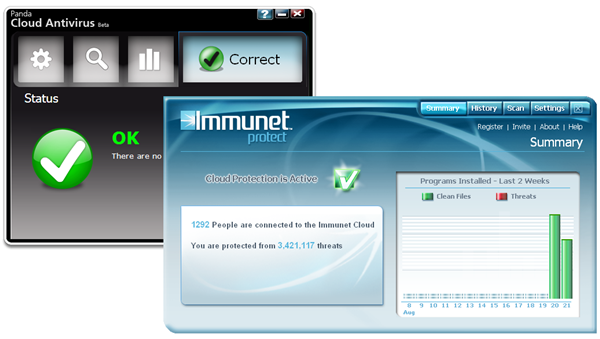
Both programs have a ‘Summary’ window that shows system’s current status and other data. But there are some differences: Panda Cloud Antivirus has a nicer interface, with visually appealing icons and large buttons that make it easier to use. Immunet Protect, on the contrary, seems to focus more on numbers and statistics, and its toolbar menu is a bit overcrowded with buttons a links. Just after installation, Immunet performs a first system scan, while Panda doesn’t lift a finger.
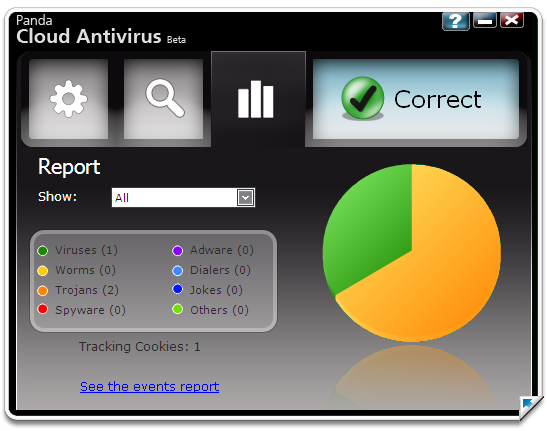
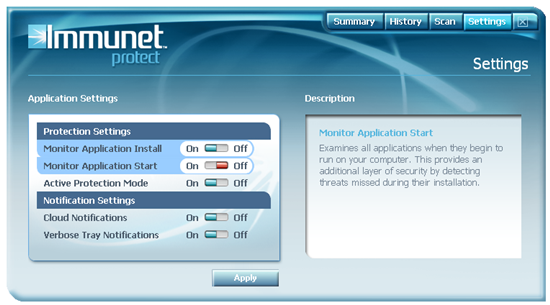
Talking about scans, Panda Cloud Antivirus features two analysis modes: one that scans the whole system, and another one that scans just the selected drive or folders. Immunet Protect only features one type of analysis (the whole system) but includes something extra: a special option to monitor applications, which scans all the programs that are installed or launched on your system.
As for memory usage, they’re very similar: Immunet is around 26 KB, while Panda uses up to 30 KB in two different processes. Also, in general terms, I noticed that Immunet Protect focuses more on the ‘community’ side of the application by encouraging you to create a user account on the developer’s website and share the app with your friends on different social networks. Panda, however, doesn’t have such a strong social side; in fact, the only “sharing” option you have available is the possibility to send information about your possible virus to Panda, which doesn’t sound exactly like a ‘community’ feature to me at all.
Summing up, both Panda Cloud Antivirus and Immunet Protect are interesting projects that offer an alternative to the typically bloated, massive security suites. They may be a good option for low-spec computers or netbooks, but in general terms, I’m not completely sure they offer the same protection as traditional desktop antivirus solutions. When talking about computer security you always look for the most reliable option, even if that takes more system resources. Also, I think computer users still have to be more familiar with the concept of cloud computing before they can start trusting their system security to an antivirus that’s partly working outside their computers.
Now, it’s time for you to speak up. Which one would you choose and why?

Posted at 2:54 pm on Aug 21st
Could you recommend me which to use? Panda Cloud seems slick and popular, but it seems to have heavy hardrive/memory footprints.
I uninstalled NOD 32 because it interrupts my gaming and everyday surfing.
I normally play Battlefield Heroes(thanks to OnSoftware for blogging about it :P) and surf the web often.
Thanks
Posted at 2:33 am on Aug 25th
I use Panda’s Cloud Antivirus since its first release and I am very pleased. It is fast and does not slow up the machine at all. I am using it both in a laptop and a netbook and works great in both. In case my experience helps
Posted at 9:50 pm on Aug 26th
One point of clarification between the two. The author here says that upon installation Panda does not do an intital scan. In fact it does but it doesn’t tell you its doing it. There is no indication or consent through the user interface saying this will or is happening.
I’ve also tested both these for usability. I have not tested detection capabilities. The biggest differences between the two regarding usability is in compatibility and CPU. As the author states Panda must be the sole AV on the machine. Immunet will co-exist with other products. I’ve tried it with 6 different AV products and it works well.
The other difference is in CPU. Immunet uses much less CPU than Panda. My laptop runs hotter with Panda installed than with Immunet.
I have really come to like Panda’s product because it does detect and protect so well. I dumped my AV client on several computers for Panda’s Cloud AV. Only time will tell if Immunet provides the same protection with a slimmer profile.
The testing continues…
Posted at 9:20 am on Aug 27th
[…] Head to Head: Immunet Protect vs. Panda Cloud (en.onsoftware.com) […]
Posted at 1:02 pm on Aug 29th
i dont feel comfy giving up my traditional seasoned AV for any new green upstart. As Immunet can work alongside, this is a BIG + for it, and im trying it out on this basis: it cannot hurt having something extra & light.
Posted at 6:11 am on Aug 30th
I’m using immunet on my laptop. It does not seem to be slowing it down much. I am very please with it.
Posted at 9:12 pm on Sep 3rd
Tested PandaCloud with AVG free, with ImmunetProtect, and with MSSecurityEssentialsbeta. Cloud does not play well with others. Scans and updates can bring your system to a dead halt if you are gaming, watching vids, listening to music or downloading. I reported my findings with suggestions and then removed it. I do like the concept but have no faith in Panda to incorporate the changes needed to make it viable. All of their security software regularly scores low in malware detection tests.
I use Spybot S & D with TeaTimer, SpywareGuard, ThreatFire and ZoneAlarm firewall on my system. All of these are designed to run side by side with AV software unless you use a suite that includes a firewall. AVG AV free was my choice for years but has recently become a resource hog and the updates are crude and slowwwwwww. I removed it. I am now running MSSE (SecurityEssentialsbeta) with those mentioned above. That is my active protection. I also use McAfee Site Advisor, McAfee Stingers, MSN Malware Removal Tools and Malwarebyte’s AntiMalware software for stand alone scans… Site Advisor is a browser plugin that warns of dangerous sites. Installed without toolbar. Works great. The other three are used for manual scans and do not run otherwise.
I have been advised that the final release of Immunet Protect will run without conflict with other AV software. I hope so. Nothing based on signatures or based in the clouds can provide 100% protection today. We need both. We need all the help we can get but it must not conflict and it must leave enough resources so we can play and conduct normal business.
Hope this helps someone. I have made 2 suggestions for MSSE. I need the option to be notified when updates are available so I can download when not using computer and the full scans are slowwwww. 7 hours plus for most systems… I have some hope the next release will address both problems.
Posted at 7:01 am on Sep 5th
Have HP mini 110-1030NR netbook with solid state hard drive. Reboot time with no AV sw is abt 70 seconds. With AVG it was about 100 or so; with Panda, it’s over 2 mins. I expected better of both, but AVG appears to beat Panda. Too bad, as I get Panda newsletters and rather like them as an entity. May reboot a few more times and see if Panda improves, if not maybe back to AVG.
Posted at 12:40 am on Nov 13th
I really like Immunet Protect, and have been using it for several weeks now. Immunet gives me an easy way to share Immunet Protect with my friends, many of whom do not have a clue about why they need antivirus protection.
I have great peace of mind knowing that my social network is protected with the “Collective Immunity” that comes from Immunet Protect.
I’m a big fan, and plan to continue using Immunet Protect on top of my current antivirus software.
https://immunet.com/user/new
Posted at 10:05 pm on Nov 20th
This review is subpar and lacking depth. Not knowing that Cloud does a behind-the-scenes scan is inexcusable, I have seen several tech reviews that confirm there is a scan. Secondly, I could care less about community, buttons, etc. but am interested in how it tests against virus situations. To those thinking that Panda Cloud works like Panda Anti-virus it does not. Panda Anti-virus has a reputation for being slow whereas the design of Cloud is different and demands little resources. If you install it wait until the behind-the-scenes scan is done first before you do a manual scan. If you do a manual scan as soon as it installs then two scan will be running at once and your system will sloooow.