AVG 9: Not such a nice antivirus anymore
AVG Anti-Virus Free has been my antivirus of choice for the past five or six years. I like its ease of use, its moderation in system resources usage and the fact that it hardly shows any window or notification. I’ve installed and tried every single new version, including AVG Anti-Virus Free 9.0, which came out only yesterday and works really well – as usual.
But I have to say that this latest version includes also some annoying little features I didn’t like at all, chiefly regarding my browser configuration. For me, browser settings are untouchable and no program should be allowed to mess with that – not even my dear old AVG Anti-Virus. I hope this is not the beginning of the end for our relationship… well, as long as I have a way to revert those changes, it won’t be.
So, what does AVG change in your browser? First, the installer includes the AVG Security toolbar for the browser. There’s nothing wrong with this toolbar; actually, it’s actually a nice security addition for your browser. But if you don’t pay attention, you’ll also let AVG change your default search engine to Yahoo!.
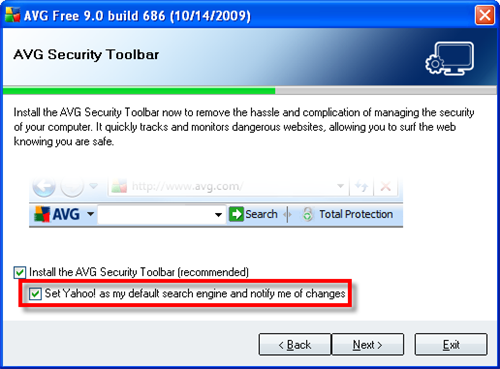
Of course, if you did miss that option and let AVG change the search engine, you can always change it back to Google (or whichever you use) within the web browser. The funny thing is that AVG Anti-Virus will warn you as if it was some piece of malware trying to modify your browser settings!
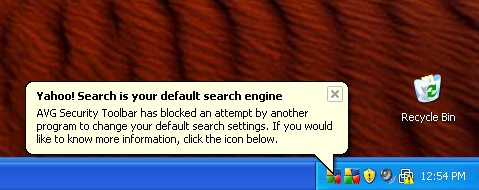
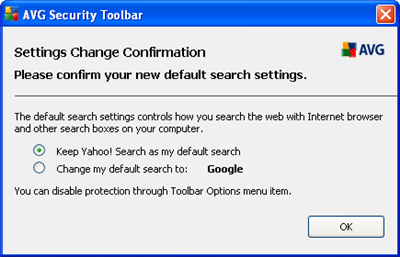
All you have to do is click the icon on the system tray and confirm the change in the following dialog window.
Another thing AVG Anti-Virus changes – and this time, without letting you know – is the New tab page. Once the AVG Toolbar is installed, your New tab page will look like this:
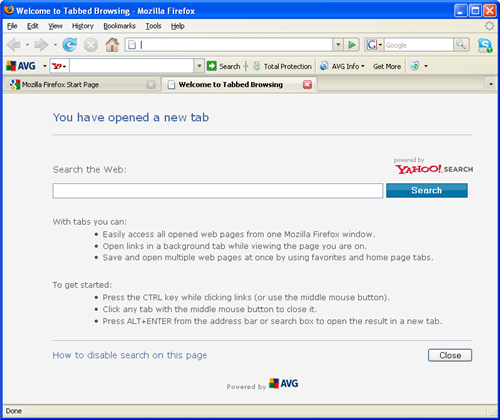
If you prefer to use the standard blank page instead, click the small black arrow beside the AVG logo on the AVG Toolbar and select Options. Then click Advanced Options and untick “Show Yahoo! search box on new tabs in the browser”. That should bring you back to the standard New tab page.
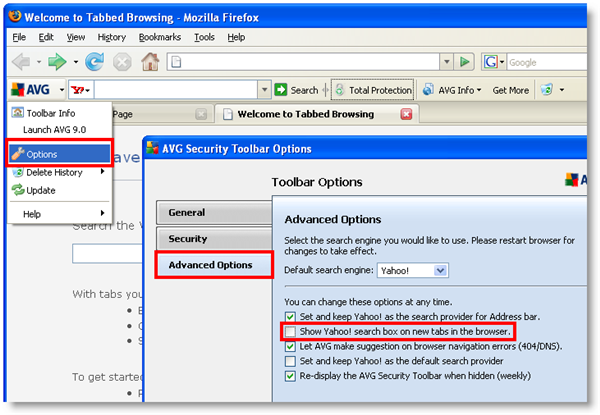
Like I said, the changes that AVG Anti-Virus 9 applies to your browser are not critical and won’t affect the browser functionality or compromise your system’s security. But it’s the kind of detail that can make you immediately dislike a program, and even switch to another one if the long run. I just hope AVG Anti-Virus doesn’t go any further in this direction, so I don’t have to take any drastic action like changing antivirus provider!

Posted at 11:03 pm on Oct 16th
First I must proclaim to be a typical guy that loves buttons. I am not exactly a computer genius, in fact self-taught. I installed AVG security outfit after my subscription to Windows live one care ran out. I started with the free version, and moved up to the $32.99 version. First I must state the changeover I did not find easy, it seemed confusing to me at the AVG site. If I had it over to do I would totally uninstall the free version and then down load the paid version. This left me feeling naked without a firewall, so I downloaded zone alarm free edition firewall. I also run webroot antiVirus with spy sweeper, it cost me about $20. I have been very happy with AVG and feel with the combination of all three I have a formidable security network. AVG and webroot are set to run at different times. I have no conflict between any of the programs.
Posted at 6:45 am on Oct 17th
I use to use AVG before 2 years but after that i found avast the best. So i am using this and is nice
Posted at 1:34 pm on Oct 17th
Thank you for the information on AVG. I am currently using Avira’s free anti-virus and have been very happy with it. I have tried them all and believe that Avira is the best. It updates daily so I am always current on the latest attack potentials. I am also using Comodo as a firewall, but it gives too many false positives. I am planning to switch back to AVG free for malware protection, but I shall keep Avira.
Posted at 11:36 pm on Oct 17th
please note; Windows has a firewall built in the OS. keep it on always.
in XP you will find in CONTROL PANEL page.
Posted at 3:31 pm on Oct 21st
Can you not click to not install the avg toolbar?
Posted at 4:06 pm on Oct 21st
Hey Jim! Yes, of course: you can choose not to install the AVG toolbar if you don’t want to.
Posted at 6:48 am on Oct 28th
My new friend and “go-to-guy” can answer a lot of your computer questions at http://www.niceget.com . He’s got my PC running better than new!
Posted at 1:01 pm on Nov 4th
The problem with security software these days is that it’s all becoming geared towards the noob user, who doesn’t have any knowledge on how to mix and match security products for the best experience. I find they can only see one button when installing software, “NEXT”, so they miss the “Do you want to install this toolbar that annoys the hell out of you every 5 minutes?”.
Instead all the developers are producing all in one-stop packages that in some cases turn out to be a “Jack of all trades - master of none”, because they cause conflicts with other security software that may be installed.
I use Avira Antivir and Windows firewall. The only gripe I have is that Avira’s servers are so slow when it comes to updates, so I do a manual update. Security software manufacturers need to keep the advanced users in mind when producing software too.
Posted at 11:35 pm on Nov 17th
I have used avg free for years, and found it to work well. I have tried a couple of times to upgrade to avg9 but the installation does not work…..and this after waiting 2hrs or so for the download to complete is not amusing.There also seems to be a security threat associated with the download site so maybe it is time to change, at least till avg get their house in order.