Subscribe

Enter your email to receive our updates in your inbox

Ask OnSoftware: How to use a webcam with Messenger for Mac

If there’s one thing that’s still poorly supported on Macs by Instant Messenger clients, it’s the iSight camera. You’d think by now, IM clients would have advanced enough to allow users to make video calls but even major ones such as Adium still don’t. Biggest culprit of them all however is Microsoft Messenger for Mac which left one OnSoftware reader ruing the day he’d bought a Mac:

Hi, I am hoping that you can give me some assistance in how to get the webcam feature to work on MSN Messenger for Macs. I was assured that before I bought my Mac that MSN Messenger works as it does on my old PC. It mentions about being a corporate user and the webcam function working. How do I become a corporate user? If you could get back to me as soon as you can with a solution it would be much appreciated.

I really feel for this user because converting to Mac can be a frustrating experience at first and stupid things like this can really make you wonder whether it was worth all the bother. It’s ridiculously unfair of Microsoft when PC users can use webcams and audio with MSN Live Messenger but Mac users can’t.

Microsoft have obviously decided that, if you’ve got enough money to buy a Mac, then you should have enough to give them some too because as the user suspects, only Messenger for Mac corporate users can use a webcam. If you’re in the same position you have two options. One is to pay hundreds (if not thousands depending on the license) of dollars and upgrade to the corporate edition which also requires Microsoft Office Communications Server 2007. The second, is to use pay nothing and use aMSN instead. Hmm, tough one.

aMSN is an open source MSN Messenger clone so its interface will feel familiar to Messenger for Mac users. The important thing however is that it’s absolutely free and it supports webcams. Starting a webcam conversation is easy.

1. Open a chat dialog with the person you want to chat to:
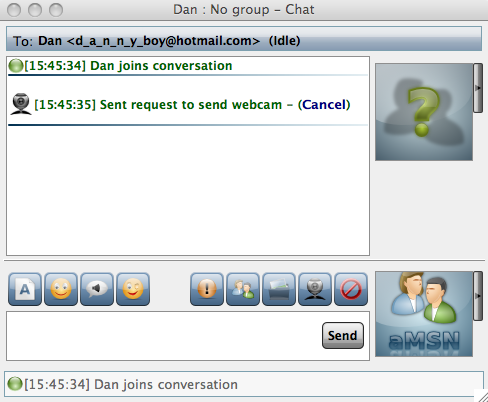
aMSN chat dialog

2. Click on the webcam symbol:

aMSN symbols

That’s it you’re done! I was using an integrated iSight camera but it should work with any external webcam. Although you can’t do audio conversations with aMSN, you can record and send sound bytes to other users. There are other advantages to aMSN over Messenger for Mac too including the possibility to sign-in to more than one account at once and conduct video conferences for free.

Recent posts

Reader comments

  1. Gary

    Posted at 5:28 pm on Nov 9th

    I am so p…. off with mac here we are moving into 2010 and still MSN does not have web cam.

    The main one . Its bloody US and upsetting when your friends come on line ask to go web cam and you cant.
    WHY WHY WHY . All that F Ing mony spent for just a graphic machine. Og crap

  2. Nicholas Mead

    Posted at 6:06 pm on Nov 9th

    I understand your frustrations Gary. Only allowing corporate users to use the webcam on their Macs with MSN Messenger is typical of why Microsoft has alienated so many users over the years.

    Just encourage your friends to switch to aMSN and ditch MSN Messenger for Mac for good :)

  3. Lars

    Posted at 5:58 pm on Nov 12th

    Thanks for your advice, but it doesn’t help me either. I was fed up with Vista and just bought a beautiful Mac, thinking that my frustrations would be over. In my case, too, the Apple reseller convinced me that I could continue chatting via aMSN, just like with Windows Live Messenger. Now I found out that NO, aMSN DOES NOT SUPPORT video+voice chat. You can just watch each other, but with no sound. What’s the point?
    Hopefully, one day WLM will work with Mac, or aMSN will support voice/video chat. But until then, I will remain a frustrated new Mac owner, as I need to pull out my PC each time I want to chat :=(

  4. Nicholas Mead

    Posted at 6:42 pm on Nov 12th

    Lars, have you tried Skype on the Mac yet? It allows you to chat with both video and audio:

    http://skype.en.softonic.com/mac

  5. Lars

    Posted at 1:40 pm on Nov 15th

    Thanks Nicholas for the hint.
    I agree Skype seems like the only viable option, but I can hardly convince all my chat contacts to switch from WLM to Skype.
    I guess I’ll be sticking to my PC, after all.
    Cheers,

  6. ruth

    Posted at 9:51 pm on Nov 20th

    i just bougth a macbook and i download the aMSN but when i try to send the webcam to my sister that lives outside of the country it doesn’t work. i also tried with someone else and it doesn’t work either . so my question is . does the webcam in aMSN only works inside of the country?

Add your comments